Deactivating a license
PioSolver licenses are personal licenses that one person can use on computers that he or she is using.
With some limitations it's possible to move license from one computer to another e.g. when buying new computer, renting a server etc. However most of PioSolver licenses are not floating licenses and they are not intended to be frequently moved from one computer to another.
The recommended way to reset your license is either from PioUpdater or from PioSolver.
Resetting license from PioUpdater
- Go to your PioSolver installation folder.
- Double-click PioUpdater.exe
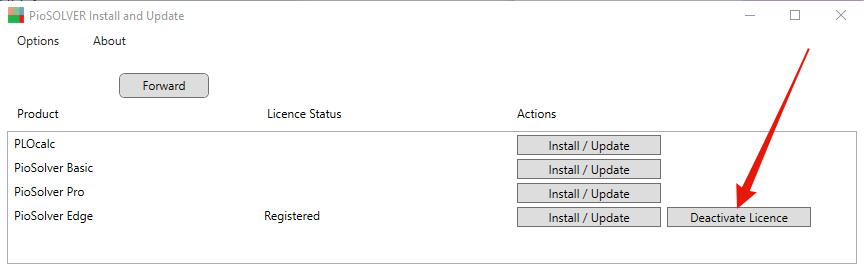
- When Updater opens navigate to the main page (see screen).
- Click "Deactivate License" button
Resetting license from PioSOLVER
- Go to your PioSolver installation folder.
- Double-click PioSOLVER-*.exe file (e.g. PioSOLVER-edge.exe or PioSOLVER-pro.exe)
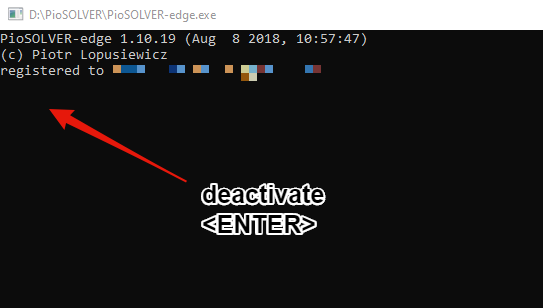
- A windows console should open (see screen).
- Type 'deactivate' (without quotes) into the window and press ENTER
This website
Only as a last resort if you have lost access to a computer with installed PioSolver you can use this website. Go to the licenses page and use the option to "Show details / manage activations of your license".
Please keep in mind that this tool has a very tight restriction on how often it can be used.
You can download the newest PioSolver installer / updater from here.